

Dual / Concurrent Enrollment
Dual enrollment from application to credit — without the spreadsheets.
Campus Credit's dual enrollment workflow — built for the way community colleges actually operate.
Shorten student degree timelines, eliminate repeated coursework, and give high school partners a clear, structured process — with every dual enrollment approval tracked and every credit posted cleanly to your SIS.
higher dual enrollment conversion with structured workflows
fewer errors when dual enrollment approvals run in one system
students earned early college credit over 24 years
Overview
Campus Credit streamlines your dual enrollment program from application to credit posting
So your team can focus on students — not spreadsheets. Automate dual enrollment scheduling, approvals, and eligibility tracking with FERPA-compliant workflows and real-time dashboards. Colleges see higher dual enrollment numbers and fewer errors, while students gain faster, clearer access to college credit.
Parent e-signatures, high school sign-off, and college review routed automatically in order — with timestamps and status visible at every stage
GPA, grade level, and prerequisites checked automatically — so staff confirm enrollment instead of auditing every concurrent enrollment submission manually
Approved students push into your SIS — no rekeying, no spreadsheet handoff, no end-of-term scramble to reconcile dual enrollment rosters
What you'll see
The full lifecycle in 30 seconds
23%
higher student conversion reported by colleges using structured dual enrollment workflows
30%
fewer administrative errors when approvals, rosters, and grades are managed in one system
600K+
students have earned early college credit through the Campus Credit platform over 24 years
Every step — automated, tracked, and visible
Campus Credit handles the full dual enrollment lifecycle so your team can focus on students, not spreadsheets. Every step is structured, timestamped, and connected — from the first application to the final grade posting.
Manage high school partnerships, concurrent enrollment agreements, instructor qualification, and roster reporting — all in one place.
Set enrollment caps per section and let the system enforce them automatically — so you never have an over-enrolled section or a student stuck on a roster that's already full.
Staff monitor enrollment status, application progress, and section health via live dashboards — without pulling reports or asking someone to check a spreadsheet.
No more paper. Students, parents, and counselors are guided through each step of the application with clear fields, required documents, and built-in eligibility checks — all online.
Automatic emails keep every stakeholder — students, parents, counselors, and college staff — informed at each step. No one has to wonder where their application stands or what comes next.
Match sections with the right credentialed instructors quickly — track adjunct qualifications, approval status, and teaching assignments all in one place, without calling around or digging through files.
From section setup to credit posting — six steps
Every dual enrollment student moves through the same structured workflow in Campus Credit — from the moment a section is created through registration, approval, and grade posting in your SIS.
Colleges set up sections with seat caps, eligibility rules, terms, and partner high schools. Every section is clearly defined before it appears in the public portal — which is Google-indexable for maximum visibility.
Set each section as school-specific — limited to one or more partner high schools — or open to any eligible student. The portal enforces access rules automatically.
Approved sections publish to a clean online portal where students, parents, and counselors browse by school, term, subject, and pathway — instead of digging through PDFs or scattered flyers.
Students browse the portal, pick the right section, and complete a guided application with clear questions, required fields, and built-in eligibility checks — no paper, no confusion.
Each application routes automatically for parent e-signature, high school approval, and college review — in order, with timestamps, status tracking, and email reminders at every stage.
Approved students push into your SIS for registration. Rosters sync to your LMS, or export a clean file ready for upload. Grades post at term end with a full audit trail.
Section Access Models
Open enrollment and closed contract classes — both in one system
Campus Credit supports both models your institution runs — open dual enrollment sections any eligible student can access, and closed contract sections reserved exclusively for specific partner high schools or districts.
Any eligible student can apply
Open sections are published to the public portal and discoverable by any qualifying high school student — regardless of which school they attend. Colleges set the eligibility rules; the system enforces them automatically.
Searchable and browsable by all eligible students — indexed by Google for maximum discoverability
GPA, grade level, and prerequisite checks happen before submission — no manual auditing needed
When a section fills, students are automatically waitlisted — and notified if a seat opens
Parent e-signature, high school counselor approval, and college review — routed automatically in order
Track which schools drive the most applicants to open sections so you can focus outreach where it matters
Reserved for specific partner schools
Closed sections are tied to a contract or agreement with a specific high school or district — visible only to students from that school, with custom eligibility rules, instructor assignments, and approval chains configured per partnership.
Only students from the designated partner school or district can see and apply for the section
Each closed section links to the articulation or dual enrollment agreement with that partner — fully documented
Set different GPA thresholds, prerequisites, or grade-level requirements for each school partnership
Assign the approved high school instructor to the section — with credentials tracked and visible to the college
High school coordinators see only their sections, their students, and their approval queue — nothing else
Most colleges run open and closed sections in the same term. Campus Credit manages both from the same admin dashboard — same student record, same approval engine, same SIS handoff — so your staff don't have to switch tools or maintain separate processes.
Instructor Authorization
High school instructors teaching college courses — credentialed, tracked, and audit-ready
One of the most compliance-intensive parts of dual enrollment is ensuring that the high school instructors teaching college-credit courses actually meet the college's credentialing requirements. For most institutions, this means tracking transcripts, verifying subject-matter credentials, and maintaining documentation that satisfies accreditation standards — often for dozens of instructors across multiple partner schools.
Campus Credit gives your dual enrollment office a structured system for the full instructor authorization lifecycle — from credential submission through approval, section assignment, and accreditation-ready documentation.
When an accreditor or state agency asks which instructors were teaching your dual enrollment sections and whether they were qualified to do so, your answer should be a single click — not a frantic search through email attachments.
High school instructors submit their transcripts, degrees, certifications, and subject-matter credentials directly through the portal — no emailing PDFs to the department chair
Credential packets route to the appropriate department chair or academic dean for review — with a structured evaluation and a timestamped approval decision on record
Only instructors whose credentials have been reviewed and approved can be assigned to dual enrollment sections — the system prevents unauthorized assignments
Set expiration dates on instructor approvals — the system sends automatic reminders before credentials lapse so sections are never taught by an instructor whose authorization has expired
Every credential, every approval, every section assignment — stored in one place with timestamps and retrievable in seconds. When the accreditor asks, you're ready
One searchable directory of every high school instructor who has taught a dual enrollment section — with their credentials, approval history, and current assignment status
Better Experience for Students & Staff
Built with input from students, advisors, and administrators
Campus Credit isn't a generic workflow tool adapted for higher ed — it's built specifically for the dual enrollment operating model, with features shaped by real feedback from the registrars, counselors, and students who use it every day.
Via unique links or portals — students start where they are, on any device, without creating another account they'll forget
See which high schools drive the most applications, which courses convert best, and where students are dropping off
GPA, grade level, and course prerequisites enforced at the point of application — so staff don't manually audit every submission after the fact
Track adjunct credentials, teaching approvals, and section assignments — with accreditation-ready documentation for every instructor
Students see exactly how many seats are left in each section — and waitlist automatically when sections fill
Better Experience for Students & Staff
Every pending application — sorted by section, status, and school — ready to review or route in one click
See exactly where each application is — parent signed, school approved, college pending — without emailing anyone to check
Searchable and browsable by all eligible students — indexed by Google for maximum discoverability
Adjunct qualifications and approval status for every section — documented and ready for accreditation review
Which high schools send the most students, which courses fill fastest, and where enrollment is declining
Every approval, every status change, every grade posting — logged with timestamps and retrievable at any time
Public Portal & Student Experience
Help students find and claim credit before it's too late
Campus Credit includes a public-facing dual enrollment portal that promotes your credit opportunities and converts interest into completed applications — before students ever contact your office.
What the portal includes
Students find sections by school, term, subject, or pathway — with live seat availability
Students confirm they meet requirements before applying — reducing incomplete submissions
Step-by-step form with required fields — all documents collected upfront, not after submission
Students see where their application stands without calling your office
Place on partner school sites and make your offerings discoverable in search
SIS Integration
Works with the systems you already run
Campus Credit doesn't replace your SIS or scheduling tools. It gives you one clean source of truth for dual enrollment applications, approvals, rosters, and grades — then moves that data into Banner, Colleague, PeopleSoft, or any SIS your college already uses.
Download pre-filtered files for fast upload into your SIS — no manual reformatting, no spreadsheet cleanup
Campus Credit manages approvals, status changes, and instructor updates — your SIS only receives final, accurate data
Approved rosters sync to your Learning Management System so instructors have accurate class lists from day one
Begin with clean exports and build toward API integration at your own pace — Campus Credit works at whatever level your IT team is ready for
Ready to modernize your dual enrollment program?
From application to credit — in one system.
Most colleges are fully live within 30 days. Schedule a 30-minute demo and we'll walk through your dual enrollment workflow end to end.
In-Platform Screens
See what this workflow looks like inside Campus Credit.
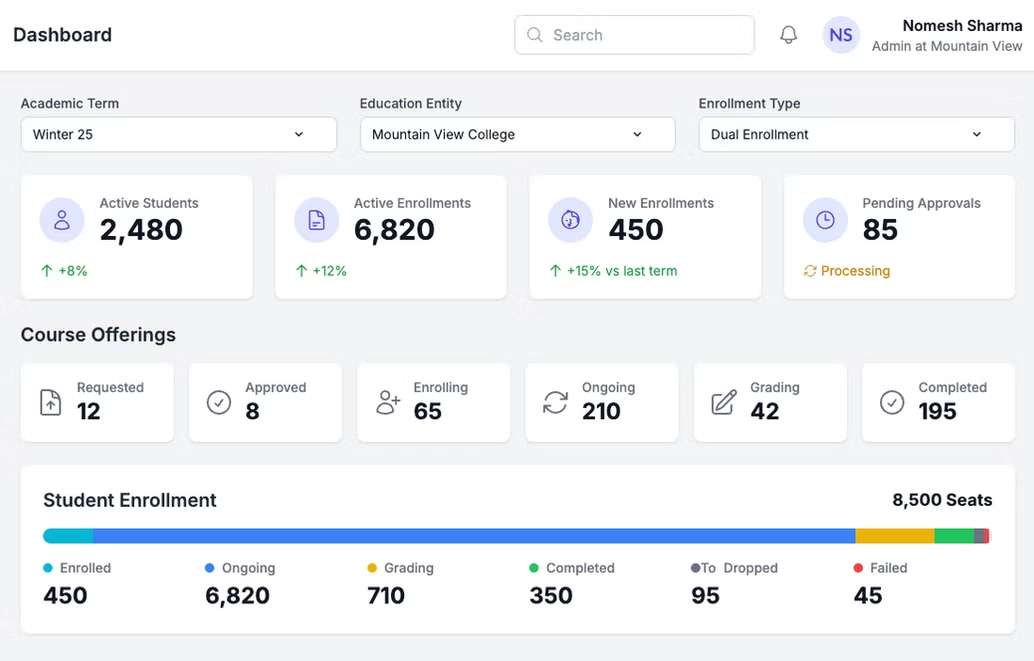
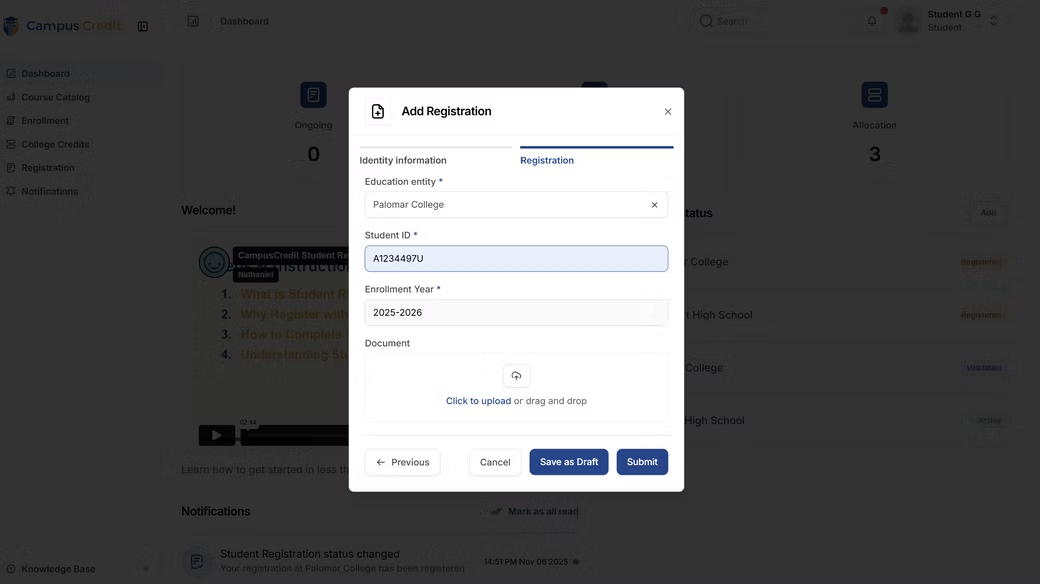

Unlocking opportunities for students and simplifying credit workflows — one clear, achievable step toward student success.